Before mastering Flexbox or Grid,
you must understand how CSS calculates size.
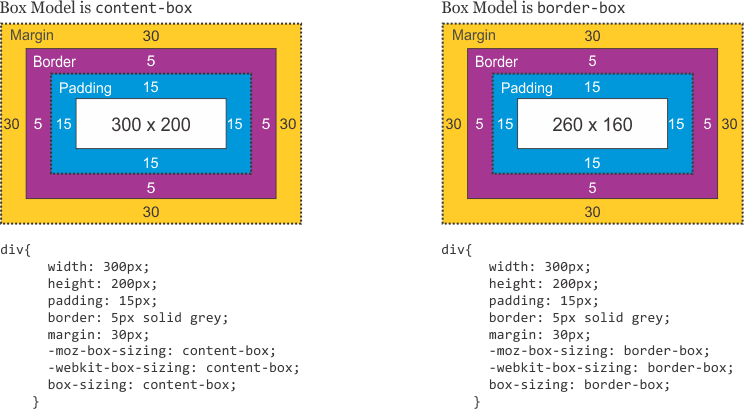
content-box (Default behavior)
In content-box, the width & height apply only to the content.
Padding and border are added outside, increasing the final size.
css
.box {
  width: 200px;
  padding: 20px;
  border: 10px solid #333;
  box-sizing: content-box;
}
👉 Actual width = 200 + 40 + 20 = 260px
🧩 border-box (Developer-friendly)
In border-box, padding and border are included inside the width & height.
css
.box {
  width: 200px;
  padding: 20px;
  border: 10px solid #333;
  box-sizing: border-box;
}
👉 Actual width = 200px (no surprise math)